
🔗 Smart tech — smart for whom?
Earlier today I quipped on social media: “We need dumb tech and smart users, and not the other way around”.
Later, I clarified that I’m not calling users of “smart” devices dumb. People are smart. The tech should try to not “dumb them down” by acting condescendingly, cutting down on their agency and limiting their opportunities of education.
A few people shared replies to the effect that they wish for smart devices that wouldn’t be at odds with the intents of the user. After all, we all want the convenience of tech, so why settle for “dumb tech”, right?
The question here becomes a game of words: what is a “smart device”, after all?
A technically-minded person will would look at smart devices like smartphones, smart TVs, etc., and say “well, they are really computers”, or “they have computers inside”. But if we want to be technically pedantic, what is a computer? Having a Turing-complete microprocessor running programs? My old trusty microwave for sure has a microprocessor, but it’s definitely not a “smart device”. So it’s not about the internals, it definitely has to do with the end-user perception of the device.
The next reasonable approximation towards a definition is that a smart device allows you to install “apps”. You can extend it with more functionality (which is really making use of the fact that it’s a “computer inside”). Smart TVs and smart phones check this box. However, other home appliances like “smart kettles” don’t, the “smartness” comes from being internet-connected. So, generally, it looks like smart devices are things you either run apps in, or control via apps (from another smart device, of course).
So, allowing for running apps pretty much makes something into a computer, right? After all, a computer is a machine for running software. But it’s really interesting to think what is in fact a computer — where do we draw the line. From an end-user perspective, a game console is also a machine for running software — a particular kind of software, games — but it is not a computer. Is a Smart TV a computer? You can install apps in it. But they are also generally restricted to a certain kind of software: streaming services, video and the like.
Something doesn’t feel like a computer unless you can run any kind of software in it. This universality is a key concept. It’s interesting how we’re slowly driven back to the most fundamental definition of a computer, Alan Turing’s definition of a computer as a universal machine. Back in 1936, before the first actual computer was built during World War II, Turing wrote a philosophy section within a mathematics paper where he made this thought exercise of what it means to compute, and in his example he used the idea of a person doing the computations by hand: reading data, applying rules to process data, producing new data, repeat. Everything that computes follows this model: game consoles, the autopilot in an airplane, PCs, the microcontroller in my microwave. And though Turing had a technical notion of universality in mind, the key point for us here is that in our end-user understanding of a computer and what makes us call some things computers and others not, is that the program (or set of allowed programs) is not fixed, and this is what we see (and Turing saw) as universal: that any program that may be expressed in the computer’s language can be written and run on it, not just a finite set.
Are smart devices universal machines, then, in either sense of the word? Well, you can install new apps in them. Then, it can do new things it couldn’t yesterday. Does that make it a computer? What about game consoles? If I buy a new game (which is effectively new software!), it can also do new things, but you won’t really look at it as a computer. The reason is because you’re restricted on the kind of new software you can make this machine run: it only takes games, it’s not universal, at least from an end-user point of view.
But game consoles are getting “smarter” nowadays! They not only play games; maybe it will also have an app for showing you the weather, maybe it will accept some streaming service… but not others — and here we’re hinting at a key point of what “smart” devices are really like. They are, in fact, on the inside, universal machines that satisfy Turing’s definition. But they are not universal machines for you, the owner. For me, my Nintendo Switch is just a game console. For Nintendo, it is a computer: they can install any kind of software in it in their next software update. They can decide that it can play games, and also access Youtube, but not Netflix. Or they could change their mind tomorrow. From Nintendo’s perspective, the Switch is a universal machine, but not from mine.
The same thing happens, for example, with an iPhone. For Apple, it is a computer: they can run anything on it, the possibilities are endless. From the user’s perspective, it is a phone, into which you can install apps, and in fact choose from a zillion apps in the App Store. But the the possibilities, vast as they may be, are not endless. And that vastness doesn’t help much. From a user perspective, it doesn’t matter how many things you can do with something; what matters are what things you want to do with it, which of those you can and which ones you can’t. Apple still decrees what’s allowed and what isn’t in the App Store, and will also run their own software on the operating system, over which you have zero say. A Chromecast may also be a computer on the inside, with all the necessary networking and video capabilities, but Google has decided that it won’t let me easily play my movies with it, and so it can’t, just like that.
And such is the reality of smart devices. My Samsung TV is my TV, but it is Samsung’s computer. My house is filled, more and more, with computers over which I have no control. And they have control over what I can and what I can’t do with the devices I bought. From planned obsolescence, to collecting data on my habits and selling it, to complicating access to functionality that is there — the common thread in smart devices is that there is someone on the other side controlling the experience. And as we progress towards the “ever smarter”, with AI-based voice assistants being added to more devices, a significant part of that experience becomes the ways it “delights and surprises you“, or, in other words, your lack of control of it.
After all, if it wasn’t surprising, if it did just what you expected and nothing more, it wouldn’t be all that “smart”, right? If you take all the “smartness” away, what remains is a “dumb” device, an empty shell, waiting for you to tell it what to do. Press a button to do the thing, and the thing happens. Don’t press, it doesn’t do the thing. Install new functionality, the new functionality is installed. Schedule it to do the thing, it does when scheduled, like a boring old alarm clock. Use it today, it runs today. Put it away, pick it up to use it ten years from now, it runs ten years from now. No surprise upgrades. No surprises.
“But what about the security upgrades”, you ask? Well, maybe I just wanted to vacuum my living room. Can’t we design devices such that the “online” component isn’t an indispensable, always-on necessity? Of course we can. But then my devices wouldn’t be their computers anymore.
And why do they want our devices to be their computers? It’s not to run their software in it and free-ride on our electricity bill — all these companies more enough computers of their own than we can imagine. It’s about controlling our experience. Once the user has control over which software runs, they make the choices. Once they don’t, the choice is made for them. Whenever behavior that used to be user-controlled becomes automatic in a “smart” (i.e., not explicitly user-dictated) way, that is a way where a choice is taken away from you and driven by someone else. And they might hide choices behind “it was the algorithm”, which gives a semblance of impersonality and deniability, but putting the algorithm in place is a deliberate act.
Taking power away from the user is a deliberate act. Take social networks, for example. You choose who to follow to curate your timeline, but then they say “no, we want our algorithm to choose who to display in your timeline!”. Of course, this is always to “delight” you with a “better experience”; in the case of social networks, a more addictive one, in the name of user engagement. And with the lines between tech conglomerates and smart devices being more and more blurred, the effect is such that this control extends into our lives beyond the glass screens.
In the past, any kind of rant like this about the harmful aspects of any piece of tech could well be responded with a “just don’t use it, then!” In the world of smart devices, the problem is that this is becoming less of an option, as the fabric of our social and professional lives increasingly depends on these networks, and soon enough alternatives will not available. We are still “delighted” by the process, but just like, 15 years in, a smartphone is now just a phone, soon enough a smart kettle will be just a kettle, a smart vacuum will be just a vacuum and we won’t be able to clean our houses unless Amazon says it’s alright to do so. We need to build an alternative future, because I don’t want to go back to using a broom.

🔗 Protests and the space launch
I am not going to talk directly about the US protests. Instead, I will briefly note the role of the State in them, both as cause—promoting institutional racism—and as a continuing instigator. But aren’t the protests for justice, which supposedly needs to come from the State? But the government is clearly not interested in justice. So we have on one side the people, on the other side the State. But it didn’t have to be this way by definition: it’s _this_ particular state that’s the problem. And this makes me think of Peter Thiel.
Peter Thiel has said, in no uncertain terms, that he does not believe in democracy and ultimately wants the destruction of any form of State. That’s what he went up on stage in the elections for. That’s what the alt-right stands for. This is not a crisis, this is an ongoing plan. Historians will look at this as a multi-decade process, with the early 1980s under Reagan and Thatcher as the first inflection point, and the last few years with the alt-right, Trump and Brexit as the second one.
The first stage, neoliberalism, was about crippling the state in order to declare it inefficient and privatize it. In the 90s in particular this was sped up in practice and played down in discourse, but early on this was the stated goal.
Now at the second stage, it is no longer about crippling government institutions. It is about crippling the concept of government itself: get the incompetent to power, so that the supposed flaws of the democratic model become evident. Then offer something else.
Of course, the trickery there is that invariably the incompetent were led to power in various places by apparently legal but effectively criminal means: mass propaganda done in breach of campaign funding laws, voter supression, buying congress.
So now we’re at the stage where there’s a useful minority of radicalized fascists ensuring we get the worst possible government, and a mass of average people whose heroes are billionaires, ranging from your monopolist-turned-philantropist to your tweeting-techbro bigot. It may seem contradictory that the forces that are ultimately destroying the notion of nation-state ostensibly employ the discourse of nationalism. But if you pay attention, they are priming their base on adapting to the upcoming state of things.
This pandemic is the first time in history when we see a national crisis being addressed by the government by giving a press release and giving names of _companies_ who are going to be doing this and that to deal with the issue. This was very, very startling to see.
The notion that is up for companies and not the state to organize society is being normalized. America is at the forefront of this process, and has been for a long time. Other places still have things like functioning health and educational systems, but the pressure exists. In that sense, the landmark space launch — once a matter of national pride, now privatized into another triumph of business over country — led by Thiel’s associate Musk, is not at all disconnected from the ongoing events. They are deeply, closely connected.
Thiel’s company Palantir — named after the all-seeing eye in LOTR, another techbro favorite — provides machinery for mass surveillance in the the US. The surveillance people worldwide are under is already managed by a private company.
When you think of Russia and its oligarchs, or the growing number of billionaires in China’s parliament — why lobby the middleman, just buy a Congress seat for yourself — we see that the increasingly direct control of superpowers by businessmen is not an American-only phenomenon. It might be that the façade of a state will stick around for long, as a useful device as people cling to their flags and anthems, but I feel the foundations of the modern nation-state slowly crumble into dust under my feet, and I do not like what’s taking its place.
Zygmunt Bauman saw it back in the 1990s: in a world of companies, we’re no longer citizens, only consumers. And the rippling effects of this are much worse than they initially sound, but this is a conversation for another time.
🔗 Remembering Windows 3.1 themes and user empowerment
This reminiscence started reading a tweet that said:
Unpopular opinion: dark modes are overhyped
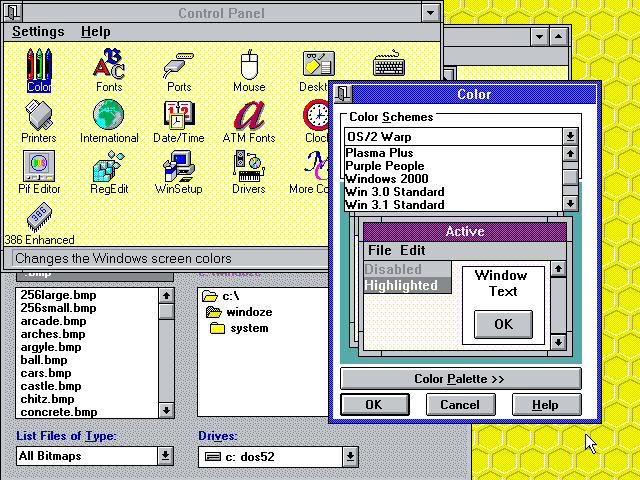
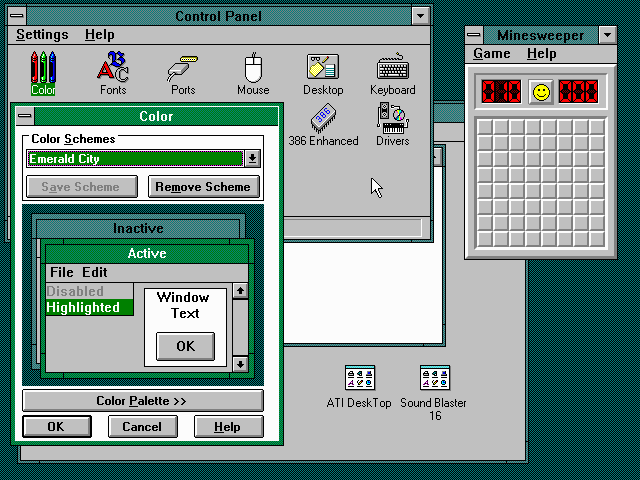
Windows 3.1 allowed you to change all system colors to your liking. Linux been fully themeable since the 90s. OSX came along with a draconian “all blue aqua, and maybe a hint of gray”.
People accepted it because frankly it looked better than anything else at the time (a ton of Linux themes were bad OSX replicas). But it was a very “Ford Model T is available in any color as long as it’s black” thing.
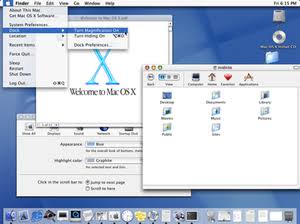
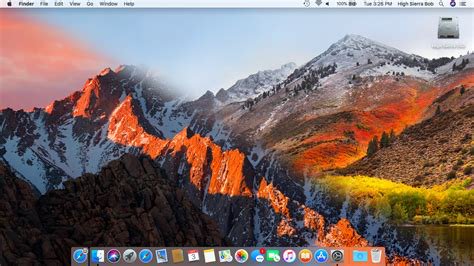
The rise of OSX (remember, when it came along Apple had a single-digit slice of the computer market) meant that people eventually got used to the idea of a life with no desktop personalization. Nowadays most people don’t even change their wallpapers anymore.
In the old days of Windows 3.1, it was common to walk into an office and see each person’s desktop colors, fonts and wallpapers tuned to their personalities, just like their physical desk, with one’s family portrait or plants.
 |
 |
|
I just showed the above screenshots to my sister, and she sighed with a happy nostalgia:
— Remember changing colors on the computer?
— Oh yes! we would spend hours having fun on that!
— Everyone’s was different, right?
— Yes! I’d even change it according to my mood.
Looking back, I feel like this trend of less aesthetic configurability has diminished the sense of user ownership from the computer experience, part of the general trend of the death of “personal computing”.
I almost wrote that a phone UI allows for more self-expression today than a Win/Mac computer. But then I realized how much I struggled to get my Android UI the way I wanted, until I installed Nova Launcher that gave me Linux-levels of tweaking. The average user does not do this.
But at least they are more likely to change wallpaper in their phones than their computers. Nowadays you walk into an office and all computers look the same.
The same thing happened to the web, as we compare the diminishing tweakability of a MySpace page to the blue conformity a Facebook page, for example.
Conformity and death of self-expression are the norm, all under the guise of “consistency”.
User avatars forced into circles.
App icons in phones forced into the same shape.
Years ago, a friend joked that the inconsistency of the various Linux UI toolkits was how he felt the system’s “freedom”. We all laughed and wished for a more consistent UI, of course. But that discourse on consistency was quickly coopted to remove users’ agency.
What begins with aesthetics and the sense of self-expression, continues to a lack of ownership of the computing experience and ends in the passive acceptance of systems we don’t control.
Changes happen, but those are independent from the users’ wishes, and it’s a lottery whether the changes are for better or for worse.
Ever notice how version changes are called “updates” and not “upgrades” anymore?
In that regard, I think Dark Mode is a welcome addition as it allows a tiny bit of control and self-expression to the user, but it’s still kinda sad to see how far we regressed overall.
The hype around it, and how excited users get when they get such crumbles of configurability handed to them, just comes to show how users are unused to getting any degree of control back in their hands.
🔗 Writing release announcement emails
Mailing lists are not exactly fashionable nowadays, but some of them remain relevant for some communities. The Lua community is one such example. As of 2017, a lot of what goes on in the Lua module development world still resonates in lua-l. With over 2500 subscribers, it’s a good way to kickstart interest in your new project.
Mailing list users tend to be somewhat pedantic about etiquette guidelines for posting, especially for announcements and the like. So, I usually follow this little formula for writing release announcement emails, which has been effective for me:
- Email subject - this is important; I use a format like “[ANN] MyProject x.y”
- Summary - The first paragraph explains what is the project
- Links and installation - Then a link to the project website, and a one-liner instruction of how to install it (that is, the incantation for the appropriate package manager — in the case of Lua,
luarocks install myproject). More detailed instructions and documentation should be available from the project website. - Description - Finally, a more detailed description:
- If the announcement is for a new version of an existing project that was previously announced on the list, I include a summarized changelog, essentially “What’s new in version x.y:”
- If this is the first announcement of the project, then a longer description of how the project works. For Lua modules, for example, this may include a really short “hello-world”-type example for the library. This is information that should be in the README.md file for your repository, which in future announcements will be reachable via the link for the project website (often a Github repo URL) mentioned above.
- License - Users should be able to figure out the license of your project easily, so especially in new projects mentioning can be a good idea — but watch out if you’re using a license that’s not the majority option in a given community. You may be unnecessarily flamed for your choice by people who don’t even want to use your project in the first place. If you’re not going with the “majority license” (and remember, license choice is your call as an author, not the community’s) it might be a better idea to avoid mailing list noise and mention the license only in the project website and sources. The goal is not to hide it (interested people should find it easily; do mention it in your project’s README.md and include a LICENSE file) but just to avoid licensing flamewars. Of course, using the majority license has major pros, so if it’s all the same to you go with it, but if you’d prefer another one, don’t let yourself be bullied by a community into picking one free software license over another. It’s your freedom too!
- Be nice! - Finally, remember to sandwich all this technical info with greetings at the top, kudos to contributors, requests for help and feedback, etc. A mailing list is a social medium, after all. :)
An example of an upgrade announcement is here:
[ANN] LuaRocks 2.4.2
Hello, list!

I'm happy to announce LuaRocks 2.4.2. LuaRocks is the Lua package
manager. (For more information, please visit http://luarocks.org )

http://luarocks.org/releases/luarocks-2.4.2.tar.gz
http://luarocks.org/releases/luarocks-2.4.2-win32.zip

Those of you on Unix who are running LuaRocks as a rock (i.e. those
who previously installed using `make bootstrap`) can install it using:

   luarocks install luarocks

What's new since 2.4.1:

* Fixed conflict resolution on deploy/delete
* Improved dependency check messages
* Performance improvements when removing packages
* Support user-defined `platforms` array in config file
* Improvements in Lua interpreter version detection in Unix configure script
* Relaxed Lua version detection to improve support for alternative
implementations (e.g. Ravi)
* Plus assorted bugfixes and improvements

This release contains commits by Peter Melnichenko, Robert Karasek and myself.

As always, all kinds of feedback is greatly appreciated.

Thank you, enjoy!

-- Hisham
An example of a new project announcement is here:
[ANN] safer - Paranoid Lua programming
Hi,

Announcing yet another "strict-mode" style module: "safer".

* http://github.com/hishamhm/safer

Install with
   luarocks install safer

# Safer - Paranoid Lua programming

Taking defensive programming to the next level. Use this module
to avoid unexpected globals creeping up in your code, and stopping
sub-modules from fiddling with fields of tables as you pass them
around.

## API

#### `safer.globals([exception_globals], [exception_nils])`

No new globals after this point.

`exception_globals` is an optional set (keys are strings, values are
`true`) specifying names to be exceptionally accepted as new globals.
Use this in case you have to declare a legacy module that declares a
global, for example. A few legacy modules are already handled by
default.

`exception_nils` is an optional set (keys are strings, values are
`true`) specifying names
to be exceptionally accepted to be accessed as nonexisting globals.
Use this in case code does feature-testing based on checking the
presence of globals. A few common feature-test nils such as `jit` and
`unpack` are already handled by default.

#### `t = safer.table(t)`

Block creation of new fields in this table.

#### `t = safer.readonly(t)`

Make table read-only: block creation of new fields in this table
and setting new values to existing fields.

Note that both `safer.table` and `safer.readonly` are implemented
creating a proxy table, so:

* Equality tests will fail: `safer.readonly(t) ~= t`
* If anyone still has a reference to this table prior
  to creating the safer version, they can still mess
  with the unsafe table and affect the safe one.

About
-----

Licensed under the terms of the MIT License, the same as Lua.

During its genesis, this module was called "safe", but I renamed it
to "safer" to remind us that we are never fully safe. ;)

-- Hisham
http://hisham.hm/ - @hisham_hm
Hope this helps!
🔗 htop 2.0 released!
This week I finally released htop 2.0.0!
- htop-2.0.0.tar.gz
MD5 06f76c7d644ce8ae611c9feb10439a30SHA-256 d15ca2a0abd6d91d6d17fd685043929cfe7aa91199a9f4b3ebbb370a2c2424b5
What’s new in htop 2.0
Since version 2.0, htop is now cross-platform!
Check out the video and slides of my presentation at FOSDEM 2016
about how this came to be. This release includes code supporting Linux, FreeBSD, OpenBSD and Mac OS X.
There are also, of course, some new features:
- If you’re using NCurses 6, htop will also support your mouse wheel for scrolling.
- Moving meters and columns around in the setup screen is a lot more comfortable now.
- You can now press “e” to see the set of environment variables for a process.
- The “graph” mode for meters was revamped, inspired by James Hall’s vtop.
…And of course, lots of other tweaks and fixes!

Changelog
The changelog with the main new changes follows below. Special thanks
to everyone who contributed for this release, through bug reports, bug
fixes, new features and financial support for the platform abstraction
layer project!
- Platform abstraction layer
- Initial FreeBSD support
- Initial Mac OS X support
(thanks to David Hunt) - Swap meter for Mac OSX
(thanks to Ștefan Rusu) - OpenBSD port
(thanks to Michael McConville) - FreeBSD support improvements
(thanks to Martin Misuth) - Support for NCurses 6 ABI, including mouse wheel support
- Much improved mouse responsiveness
- Process environment variables screen
(thanks to Michael Klein) - Higher-resolution UTF-8 based Graph mode
(Thanks to James Hall from vtop for the idea!) - Show program path settings
(thanks to Tobias Geerinckx-Rice) - BUGFIX: Fix crash when scrolling an empty filtered list.
- Use dynamic units for text display, and several fixes
(thanks to Christian Hesse) - BUGFIX: fix error caused by overflow in usertime calculation.
(thanks to Patrick Marlier) - Catch all memory allocation errors
(thanks to Michael McConville for the push) -
Several tweaks and bugfixes
(See the Git log for details and contributors!)
Follow
🐘 Mastodon ▪ RSS (English), RSS (português), RSS (todos / all)
Last 10 entries
- Disable GitHub's custom font
- Configuração do Warsaw para acessar o Banco do Brasil no Linux em 2026
- Receita de sopa de moranga da Vanessa
- The Lua community needs to learn to move on
- Aniversário do Hisham 2026
- Aniversário do Hisham 2025
- The aesthetics of color palettes
- Western civilization
- Why I no longer say "conservative" when I mean "cautious"
- Sorting "git branch" with most recent branches last