
🔗 htop 2.0 released!
This week I finally released htop 2.0.0!
- htop-2.0.0.tar.gz
MD5 06f76c7d644ce8ae611c9feb10439a30SHA-256 d15ca2a0abd6d91d6d17fd685043929cfe7aa91199a9f4b3ebbb370a2c2424b5
What’s new in htop 2.0
Since version 2.0, htop is now cross-platform!
Check out the video and slides of my presentation at FOSDEM 2016
about how this came to be. This release includes code supporting Linux, FreeBSD, OpenBSD and Mac OS X.
There are also, of course, some new features:
- If you’re using NCurses 6, htop will also support your mouse wheel for scrolling.
- Moving meters and columns around in the setup screen is a lot more comfortable now.
- You can now press “e” to see the set of environment variables for a process.
- The “graph” mode for meters was revamped, inspired by James Hall’s vtop.
…And of course, lots of other tweaks and fixes!

Changelog
The changelog with the main new changes follows below. Special thanks
to everyone who contributed for this release, through bug reports, bug
fixes, new features and financial support for the platform abstraction
layer project!
- Platform abstraction layer
- Initial FreeBSD support
- Initial Mac OS X support
(thanks to David Hunt) - Swap meter for Mac OSX
(thanks to Ștefan Rusu) - OpenBSD port
(thanks to Michael McConville) - FreeBSD support improvements
(thanks to Martin Misuth) - Support for NCurses 6 ABI, including mouse wheel support
- Much improved mouse responsiveness
- Process environment variables screen
(thanks to Michael Klein) - Higher-resolution UTF-8 based Graph mode
(Thanks to James Hall from vtop for the idea!) - Show program path settings
(thanks to Tobias Geerinckx-Rice) - BUGFIX: Fix crash when scrolling an empty filtered list.
- Use dynamic units for text display, and several fixes
(thanks to Christian Hesse) - BUGFIX: fix error caused by overflow in usertime calculation.
(thanks to Patrick Marlier) - Catch all memory allocation errors
(thanks to Michael McConville for the push) -
Several tweaks and bugfixes
(See the Git log for details and contributors!)
🔗 String interpolation in Lua
Lua is known for having a very lean standard library, and for providing mechanisms to do things instead of a ton of features.
String interpolation isn’t available out of the box, but doing it in Lua isn’t a new trick. In fact, the manual includes it as an example of string.gsub:
local t = {name="lua", version="5.3"}
x = string.gsub("$name-$version.tar.gz", "%$(%w+)", t)
--> x="lua-5.3.tar.gz"
This applies to members of a table only, though. Python is introducing a general string-interpolation syntax:
a = "Hello"
b = "World"
f"{a} {b}"
f"{a + ' ' + b}"
Given that Lua supports the f"str" syntax for functions with a single string argument, I thought it would be nice to put its Lua-provides-the-mechanisms ethos to test by trying to write my own Python-like f-string formatter.
And here it is, in all its 28-line glory (and I went for readability, and not to write it as short as possible):
function f(str)
   local outer_env = _ENV
   return (str:gsub("%b{}", function(block)
      local code = block:match("{(.*)}")
      local exp_env = {}
      setmetatable(exp_env, { __index = function(_, k)
         local stack_level = 5
         while debug.getinfo(stack_level, "") ~= nil do
            local i = 1
            repeat
               local name, value = debug.getlocal(stack_level, i)
               if name == k then
                  return value
               end
               i = i + 1
            until name == nil
            stack_level = stack_level + 1
         end
         return rawget(outer_env, k)
      end })
      local fn, err = load("return "..code, "expression `"..code.."`", "t", exp_env)
      if fn then
         return tostring(fn())
      else
         error(err, 0)
      end
   end))
end
It works just like the Python example:
a = "Hello"
b = "World"
print(f"{a} {b}")
Unlike the one-liner from the Lua manual, it also works with local variables:
local c = "Hello"
local d = "World"
print(f"Also works with locals: {c} {d}")

do
   local h = "Hello"
   do
      local w = "World"
      print(f"Of any scope level: {h} {w}")
   end
end
Some more demos:
print(f"Allows arbitrary expressions: one plus one is {1 + 1}")

local t = { foo = "bar" }
print(f"And values: t.foo is {t.foo}; print function is {_G.print}")

local ok, err = pcall(function()
   print(f"This fails: { 1 + } ")
end)
print("Errors display nicely: ", err)
If there’s interest, I can make this a module in LuaRocks (probably calling it .F rather than f)
Update! This is now available in LuaRocks as a module! Install it with:
luarocks install f-strings
More info at the f-strings GitHub page. Enjoy!
🔗 How to make a pull request on GitHub - a quick tutorial
So you made changes to a project — a bugfix or maybe a new feature — and you want to send it for inclusion in the official (“upstream”) sources. Perhaps you sent an email or opened an issue in the bugtracker, and the project maintainers asked you to send a Pull Request (PR) on GitHub. But how to do this? Here’s a quick how-to guide!
Step 0 - Have a GitHub account
Before anything, you need to have a GitHub account! If you don’t have one already, go to github.com and sign up. Just follow the instructions, it’s easy and free.
Step 1 - “Fork the repository”
“Forking a repository” on GitHub means creating your own Git repository, which is a copy of the original.
Let’s visit a repository and fork it. Start by visiting https://github.com/hishamhm/pull-request-tutorial
In the upper-right there’s a button named “Fork”. It also shows a number: how many times this repository was forked by other people).
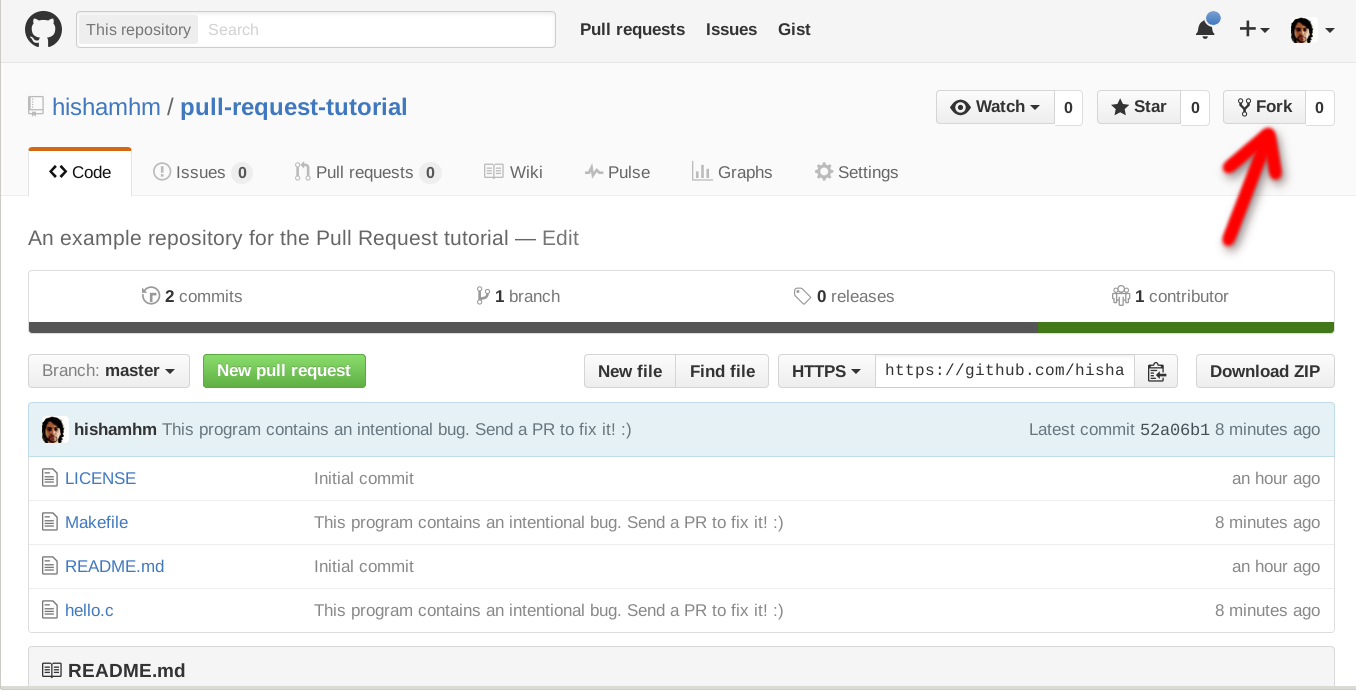
Press it, and it will create your own copy of the pull-request-tutorial repository, at https://github.com/YOUR_USERNAME/pull-request-tutorial (the real URL will, of course, contain your own username).
Step 2 - Download your fork and create a branch
Now, it’s time for you to make your changes in the source code (your bugfix or new feature). Start by downloading your repository to your computer. Go to the terminal, make sure git is installed in your computer and type:
git clone https://github.com/YOUR_USERNAME/pull-request-tutorial.git
This will download the files and create a directory called pull-request-tutorial that is linked to your fork (i.e. the copy of the repository under your control).
To avoid trouble later, let’s create a new “branch” in our repository so that the work on our bugfix or feature is stored separately. Pick a meaningful name that represents the changes you plan to make in your code. In our example, I’ll call it “fix-typo”:
git checkout -B fix-typo
Step 3 - Make your changes in your fork
Now enter the directory of your local fork, and edit it at will, implementing your bugfix or feature.
If you create a new file, remember to add it with git add:
git add new_file.txt
Commit your changes, adding a description of what was added. If you’re not used to Git, the simplest way is to commit all modified files and add a description message of your changes in a single command like this:
git commit -a -m "Fix typo in README file"
(But there are lots of ways to choose which files (and even parts of files) do commit and edit the commit message. Look for the Git documentation for details.)
Once your changes are committed, “push” the changes: send them to your GitHub repository using git push
git push
(The first time you push from a branch, Git will complain that your local branch in your computer is not connected to a branch in the GitHub server. Just do what the command tells you to do:
git push --set-upstream origin fix-typo
Next time you push again to this repository, just “git push” will do fine.)
Now, when you visit https://github.com/YOUR_USERNAME/pull-request-tutorial again, you should see your changes there.
Step 4 - Make the Pull Request
This is the simplest step! In your repository page, the next time you open the page after pushing to a new branch, there’s a big green button saying “Compare & pull request”. Press it!
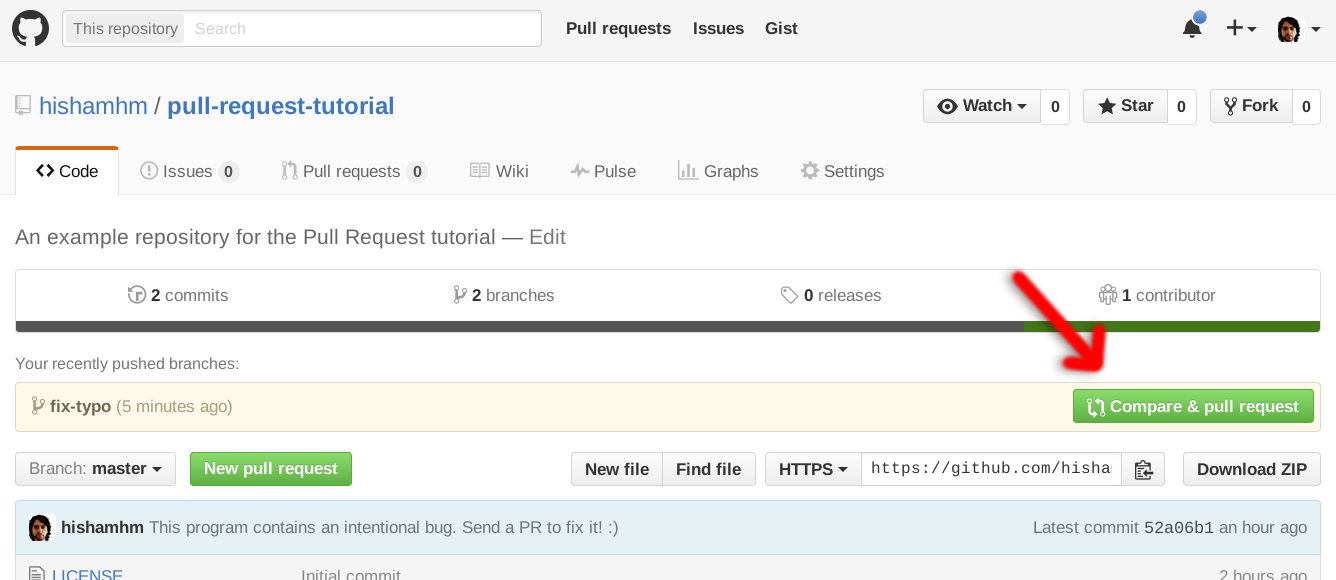
This will open a page in which you’ll be able to further edit the description for your proposed changes. Write down a nice report explaining why these changes should be included in the official sources of your project, and then confirm.
The project authors will receive an email notification that you sent them a PR. Then it’s their turn to read it and comment. You will get notifications when they comment. If they suggest any changes to your bugfix or feature, go back to Step 3, edit it and push again: your Pull Request will be automatically updated. If they are happy with the changes and want to integrate your contributions to the project, the maintainers will click “Merge” and your code will become part of the original repository!
If you want to give it a try, feel free to use the repository I created for this tutorial: https://github.com/hishamhm/pull-request-tutorial
Fork it, edit it, commit and push your changes and send me a PR!
If you liked this tutorial, leave a star on its repo. :)
🔗 Enable JSON conversion in MOXy to avoid 415 Unsupported Media Type
If you follow the “Getting Started” tutorial for Jersey (an API for writing REST apps in Java), you’ll get a nice working “Hello World” example called “simple-service”. However, if you try to extend it to use JSON using MOXy’s advertised auto-coversion of JSON into Java objects, you’ll get a “415 Unsupported Media Type” HTTP response if you don’t do it right.
Things that can cause 415 Unsupported Media Type:
Not having MOXy enabled in your pom.xml
Make sure this is present and uncommented in your pom.xml file:
      <dependency>
         <groupId>org.glassfish.jersey.media</groupId>
         <artifactId>jersey-media-moxy</artifactId>
      </dependency>
Not using @Consumes and @Produces annotations
Make sure they are set in your method:
   @POST
   @Consumes("application/json")
   @Produces("application/json")
   public string postIt(MyObject obj) {
Not sending Content-Type headers
Here’s an incantation of curl that does the right thing for testing a POST:
curl -v -H "Content-Type: application/json" -X POST -d '{"name":"hisham"}' http://localhost:8080/myapp/myresource
Not initalizing the JSON feature in MOXy
This is the default initalization given in the “simple-service” minimal example:
   public static HttpServer startServer() {
      // create a resource config that scans for JAX-RS resources and providers
      // in com.example package
      final ResourceConfig rc = new ResourceConfig().packages("com.example");

      // create and start a new instance of grizzly http server
      // exposing the Jersey application at BASE_URI
      return GrizzlyHttpServerFactory.createHttpServer(URI.create(BASE_URI), rc);
   }
and this is how you should extend it:
   public static HttpServer startServer() {

      final MoxyJsonConfig moxyJsonConfig = new MoxyJsonConfig();
      final ContextResolver jsonConfigResolver = moxyJsonConfig.resolver();

      // create a resource config that scans for JAX-RS resources and providers in given package
      final ResourceConfig rc = new ResourceConfig().packages("com.example")
                                                    .register(MoxyJsonFeature.class)
                                                    .register(jsonConfigResolver);

      // create and start a new instance of grizzly http server
      // exposing the Jersey application at BASE_URI
      return GrizzlyHttpServerFactory.createHttpServer(URI.create(BASE_URI), rc);
   }
Once all those are fixed...
Now you can add a method to MyResource such as:
   @POST
   @Consumes("application/json")
   @Produces("application/json")
   public MyObject postIt(MyObject obj) {
      obj.name += " world";
      return obj;
   }
given that you have a class like
   public class MyObject {
      public String name;
   }
and the conversion to-from JSON will work automagically:
curl -v -H "Content-Type: application/json" -X POST -d '{"name":"hisham"}' http://localhost:8080/myapp/myresource
> POST /myapp/myresource HTTP/1.1
> Host: localhost:40409
> User-Agent: curl/7.42.1
> Accept: */*
> Content-Type: application/json
> Content-Length: 17
>
< HTTP/1.1 200 OK
< Content-Type: application/json
< Date: Mon, 14 Dec 2015 18:23:46 GMT
< Content-Length: 23
<
{"name":"hisham world"}
🔗 Generalized nullable operators
Today I was writing some Lua code and had to use something like this for the millionth time:
logger:fine("my message " .. (extra_data or ""))
Since operators in Lua fail when applied to null (and thankfully don’t do wat-eseque coercions), whenever I want to perform an operation on a value that may be null, I have to add the neutral element of the operation as a fall back:
print(a + (b or 0))
print(x * (y or 1))
This got me thinking of null-conditional operators such as ?. that some other languages such as C# have.
Then I wondered: wouldn’t it be nice if “?” could be a modifier to any operator?
Creating null-checking operators
Here’s the initial sketch of the idea: in case of a “nullable operator”, just cancel the operation when given a null operand: i.e., return the left-hand value in case the right-hand value is null.
Or, expressed in Haskell, here’s a function “rightCheckNullable” that takes a normal operator and converts it to a nullable version checking the right-hand value (”nullable types” are represented as “Maybe” types in Haskell):
rightCheckNullable :: (a -> b -> a) -> (a -> Maybe b -> a)
rightCheckNullable fn = a b ->
   case b of
   Just x  -> fn a x
   Nothing -> a
Let’s create some nullable operators:
(+?) = rightCheckNullable (+) -- nullable addition
(*?) = rightCheckNullable (*) -- nullable multiplication
(++?) = rightCheckNullable (++) -- nullable concatenation
And give them a spin:
main =
   let
      v1 :: Float
      v1 = 123

      v2 = Nothing

      v3 :: Maybe Float
      v3 = Just 456
   in
      do
         print $ show (v1 +? v2) -- prints 123.0
         print $ show (v1 +? v3) -- prints 579.0
         print $ show (v1 *? v2) -- prints 123.0
         print $ "hello" ++? Just "world" -- prints helloworld
         print $ "hello" ++? v2 -- prints hello
With something like the above, instead of a + (b or 0) and x * (y or 1), one could write simply:
print(a +? b)
print(x *? y)
This could give back some of the terseness we have when null auto-coerces to other types, without surprises with various operations. In JavaScript, null coerces to 0 when it is an integer, which gives us a proper neutral element for addition but not for multiplication.
Null-checking in C#
Note, however, that my choice of picking the right-hand value and checking the left-hand value only was arbitrary (though it works well for the examples above).
In C#, operations on nullable types are always lifted: the operators of the original types are extended with a check where, if either of the arguments is null, the result of the operation is null.
In Haskell, this transformation would be the following, taking a function that goes from a’s to b’s producing c’s, and producing an equivalent function that goes from Maybe a’s to Maybe b’s producing Maybe c’s:
bothCheckNullable :: (a -> b -> c) -> (Maybe a -> Maybe b -> Maybe c)
bothCheckNullable fn =
    ma mb ->
      case ma of
         Nothing -> Nothing
         Just a ->
            case mb of
               Nothing -> Nothing
               Just b -> fn a b
(In Haskell, you don’t have to actually write this function, since can use Control.Applicative.liftA2, a generalization of the above, to get the same result)
Checking the left-hand value
This makes me think that my “nullable operator modifier” could be aplied to either side (or both). Note that the syntax for null-conditional in C# is already ?., with the question-mark on the left-hand side, since the value being checked for nullity is the left-hand one. We don’t want x?.y to return y when x is null, though. A more sensible semantics for left-hand ? would be a “short-circuiting” one:
leftCheckNullable :: (a -> b -> c) -> (Maybe a -> b -> Maybe c)
leftCheckNullable fn = a b ->
   case a of
   Just x  -> fn x b
   Nothing -> Nothing
The flood gates are open!
There is still an asymmetry here, as rightCheckNullable is the only one that returns the “other value” when one of them is null.
In fact, we could have six versions of the conversion function: right-check, both-check, left-check, each of them returning the “other value” (as I did with +?) or null. If we called the C#-like version +??, this means addition could be modified into: +?, ?+, ?+?, +??, ??+, ??+??.
(And there could be two more variants of course, ?+?? and ??+?, but coming up with a realistic example using them would be a nice exercise in creative coding.)
But would it make sense to have so many modifiers?
Well, for one, instead of writing this
logger:severe("Error: connection failed" .. (details and (" - details: "..details) or ""))
we could write something like:
logger:severe("Error: connection failed" ..? (" - details: " ..?? details))
I know this is a step into the world of APL, and I’m not arguing this is a great or even good idea, but it was fun to think about, so I thought I’d share.
Follow
🐘 Mastodon ▪ RSS (English), RSS (português), RSS (todos / all)
Last 10 entries
- Disable GitHub's custom font
- Configuração do Warsaw para acessar o Banco do Brasil no Linux em 2026
- Receita de sopa de moranga da Vanessa
- The Lua community needs to learn to move on
- Aniversário do Hisham 2026
- Aniversário do Hisham 2025
- The aesthetics of color palettes
- Western civilization
- Why I no longer say "conservative" when I mean "cautious"
- Sorting "git branch" with most recent branches last